API Basics: Key Terms & Concepts
If you're new to APIs, this guide explains basic API terminology and logical principles that will be used in further API documentation.
API
An API (Application Programming Interface) is a way for different software applications to talk to each other. It acts as a bridge that allows one system to request and exchange data with another.
Think of APIs as digital messengers that pass requests between applications, making workflows smoother and faster. The popular real-world analogy is a waiter at a restaurant (API) which brings to you (the user) the meal you've ordered (response to your request).
Postman
Postman is a popular tool used for testing, developing, and managing APIs. With Postman, you can:
- Send API requests
- View responses returned by an API in a structured format (JSON, XML, etc.)
- Use API authentication with API tokens
- Automate repetitive tasks by running scripts
- Save & share requests by organizing API requests into collections
We recommend starting your automation journey with Postman, as it simplifies API testing and automation, making it a great first step before diving into more advanced tools.
Since Postman is the most beginner-friendly tool for automation, we will use it as a base for examples.
API Request & Response
An API request is like ordering food at a restaurant. You tell the kitchen (API) what you want by providing specific details (parameters). The kitchen processes your request and sends back the meal (response).
An API request usually includes:
- Endpoint (URL) – the address where the request is sent
- Method – the request type (=action): GET, POST, PUT, DELETE
- Headers – extra information (e.g., authentication)
- Body – data sent with the request (e.g., login details)
You request weather data in Tallinn from an API, and the API responds with the current temperature and forecast.
GET https://api.weather.com/data?city=Tallinn
API Endpoint
An endpoint is a specific URL where an API (Application Programming Interface) receives requests. It’s like a door that allows different systems to communicate by sending and receiving data.
- GET request to an endpoint: if you send a GET request
https://launcher.indigobrowser.com:45001/api/v1/versionin Postman and click "Send," the API will return the app version. - POST request to an endpoint: if you send a POST request to
https://launcher.indigobrowser.com:45001/api/v2/profile/quickwith user details in the body, the API will start a quick profile.
Think of an endpoint as a phone number – you dial it (send a request), and depending on what you ask, you get a response.
In Postman, an endpoint is the URL you enter when testing an API.
HTTP Request Types
APIs use HTTP request types (also called methods) to specify the type of action needed:
| HTTP method | Purpose | Example usage |
|---|---|---|
| GET | Retrieve data from a server | Get profile details |
| POST | Send new data to a server to create or update a resource | Create a new profile |
| PUT | Update existing data | Update cookies metadata |
| DELETE | Remove data | Delete a profile |
https://launcher.indigo.yt:45001/api/v1/versionis a GET request as it returns info.https://launcher.indigo.yt:45001/api/v2/profile/quickis a POST request as it creates a new quick profile.
API Token
An API token is like a digital key that allows you to securely access an API. When you make a request to the API, you need to include this token, so the system knows who you are and whether you're allowed to perform the action.
Think of it as a hotel key card. Without it, you can’t enter your room (access the API).
To send a new request in Postman, you first need to copy an API token to the authorization field to authenticate:
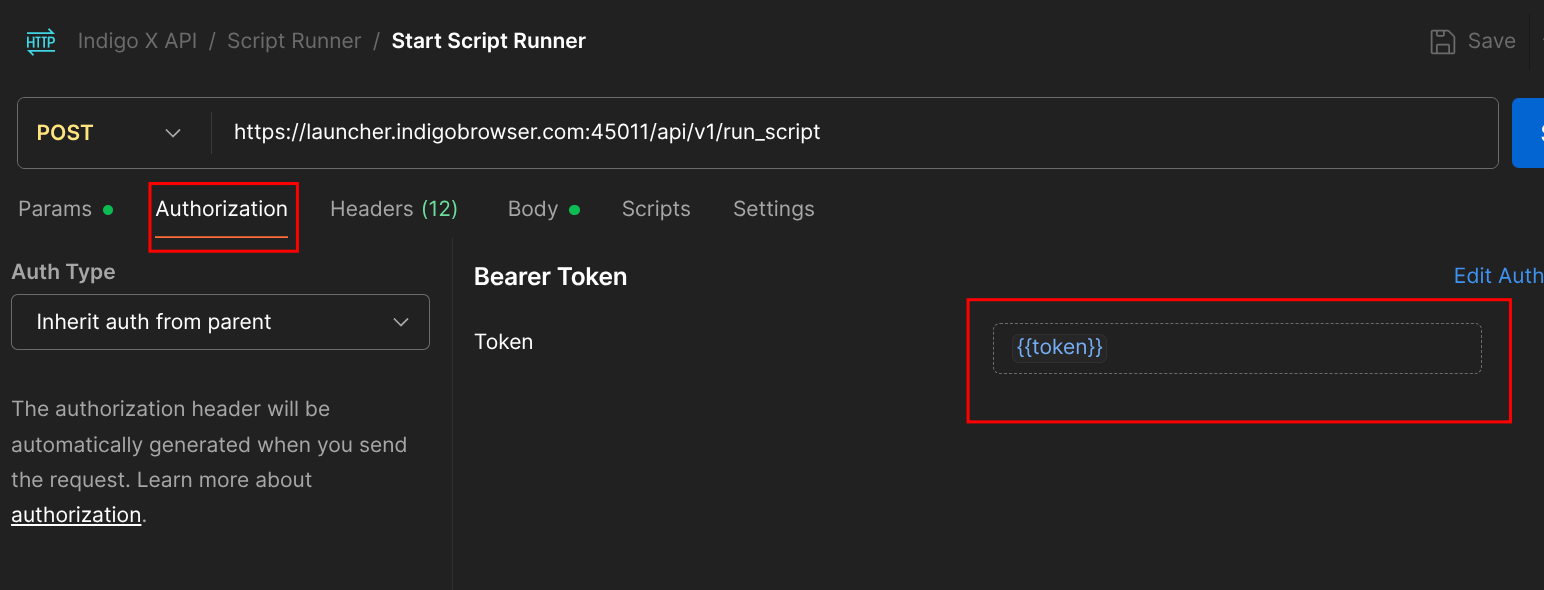
Don't know where to get the token from? Check the detailed guide in the quick-start guide for beginners!
Rate Limits & RPM (Requests Per Minute)
APIs have limits on how many requests you can send within a certain time to prevent overuse – this is called Rate Limiting, and it's often measured in RPM (Requests Per Minute). Indigo RPM limit depends on the subscription type; check the pricing page for details.
How does RPM work?
- RPM tells you how many requests you can send in one minute.
- Each time you ask the API to do something (like fetching data or updating a record), it counts as one request.
If your limit is 100 RPM, you can send up to 100 requests per minute. If you hit your limit, try waiting a minute or upgrading your plan to send more requests!
WebDriver
You are stepping onto more advanced ground! Skip this section if you are a beginner.
A WebDriver is a tool that allows automated interaction with web browsers. It controls the browser just like a real user would – clicking buttons, filling forms, and navigating pages. Indigo X supports integration with automation libraries like Selenium, Puppeteer, and Playwright, enabling tasks such as form filling, CAPTCHA solving, and web scraping.
Selenium
The most popular WebDriver is Selenium WebDriver, which works with browsers like Chrome, Firefox, and Edge: it allows automation using programming languages like Python, Java, JavaScript, and C#.
from selenium import webdriver

driver = webdriver.Chrome()
driver.get("[https://example.com](https://example.com)")
print(driver.title)
driver.quit()
Puppeteer
Puppeteer is a Node.js library developed by Google that allows you to automate and control web browsers (like Chrome and Chromium) programmatically. It provides a high-level API to interact with web pages—clicking buttons, filling forms, scraping data, generating PDFs, and more.
const puppeteer = require('puppeteer');

(async () => {
  const browser = await puppeteer.launch();
  const page = await browser.newPage();
  await page.goto('[https://example.com](https://example.com)');
  await page.screenshot({ path: 'example.png' });
  await browser.close();
})();
Playwright
A modern open-source automation framework for web testing, developed by Microsoft. It allows you to control web browsers like Chrome, Firefox, and Edge programmatically, just like a real user.
const { chromium } = require('playwright');

(async () => {
  const browser = await chromium.launch();
  const page = await browser.newPage();
  await page.goto('[https://example.com](https://example.com)');
  console.log(await page.title());
  await browser.close();
})();